Guide
How to Grade an Entire Class With One Prompt
May 2026 · 7 min read · By Proctor AI Team
Grading an entire class with one prompt sounds like a shortcut, but it is exactly how Proctor AI is designed to work. You describe the job once in plain language, and the agent handles the rest: splitting the class PDF, grading each paper against your rubric, and getting results ready to share. Here is the full workflow.
The four-step workflow
- Ask or upload the assignment: Ask the agent to draft the assignment, or upload one you already have. It keeps the rubric attached so it knows how to grade later.
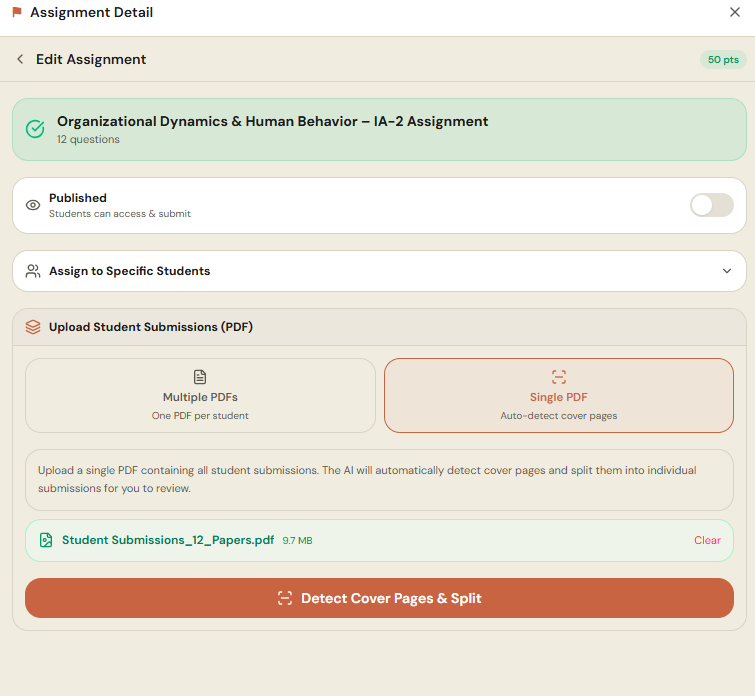
- Upload one PDF of the whole class: Scan the answer sheets into a single PDF. The agent splits every submission on its own and matches each to the right student.
- Type one prompt: Tell it to grade against the rubric, give partial marks, flag copying, and write feedback. One instruction triggers the whole pass.
- Review and share: Results come back as drafts. Adjust anything you disagree with and share with the class in one click.
The one prompt that does it all
A single prompt is enough to run grading, partial credit, an integrity check, and feedback together. For example:
Grade all submissions against the rubric, give partial marks for working, flag any copying, and write one line of feedback per student.
Review and approve
The results come back as drafts. You can:
- Open any paper and see the reason behind each mark.
- Adjust a score and let the agent apply your preference across the batch.
- Review the integrity flags before deciding what to do.
- Approve and share results with the class in one click.
Why one prompt beats clicking through menus
Traditional grading tools make you upload, tag, configure, and click through screen after screen. A prompt-driven agent collapses all of that into a sentence. You stay focused on the teaching decision, not the software, and the busywork disappears.
Frequently asked questions
Can I really grade a whole class with one prompt?
Yes. After you upload a single PDF of the class, one prompt tells the agent to split the papers, grade each against your rubric, flag copying, and write feedback. You then review and approve the results.
Do I need to separate the papers myself?
No. You upload one combined PDF and the agent splits every submission automatically and matches each to the right student.
Can I ask follow up questions after grading?
Yes. In the same conversation you can ask which questions the class struggled with, who is falling behind, and what to teach next, because the agent knows your class context.